Keith Maines / Kitter

01. PROJECT OVERVIEW

This case study shares my six-month contract as a UI/UX Designer at a niche social media platform startup. It details how I solved the challenge of integrating a seamless eCommerce experience and applied technical UI skills to tackle real-world challenges.

This case study shares my six-month contract as a UI/UX Designer at a niche social media platform startup. It details how I solved the challenge of integrating a seamless eCommerce experience and applied technical UI skills to tackle real-world challenges.

This case study shares my six-month contract as a UI/UX Designer at a niche social media platform startup. It details how I solved the challenge of integrating a seamless eCommerce experience and applied technical UI skills to tackle real-world challenges.

02. ROLE

02. ROLE

A New

Journey

A New

Journey

After completing my Google UX Design Certification, I began my first six-month contract with a growing startup. This opportunity wasn’t just about applying what I’d learned—it was about stepping into unfamiliar territory, adapting quickly, and creating meaningful impact in a short amount of time.

After completing my Google UX Design Certification, I began my first six-month contract with a growing startup. This opportunity wasn’t just about applying what I’d learned—it was about stepping into unfamiliar territory, adapting quickly, and creating meaningful impact in a short amount of time.

grayscale photo of man in backpack walking on pathway

03. KEY CHALLENGES

03. KEY CHALLENGES

Navigating New Challenges

The Challenge

The Challenge

As the sole UI/UX Designer on this project, I had to quickly adapt to a new product, team dynamic, and development process. The startup wanted to evolve its niche social media platform by introducing an integrated eCommerce store in the near future.


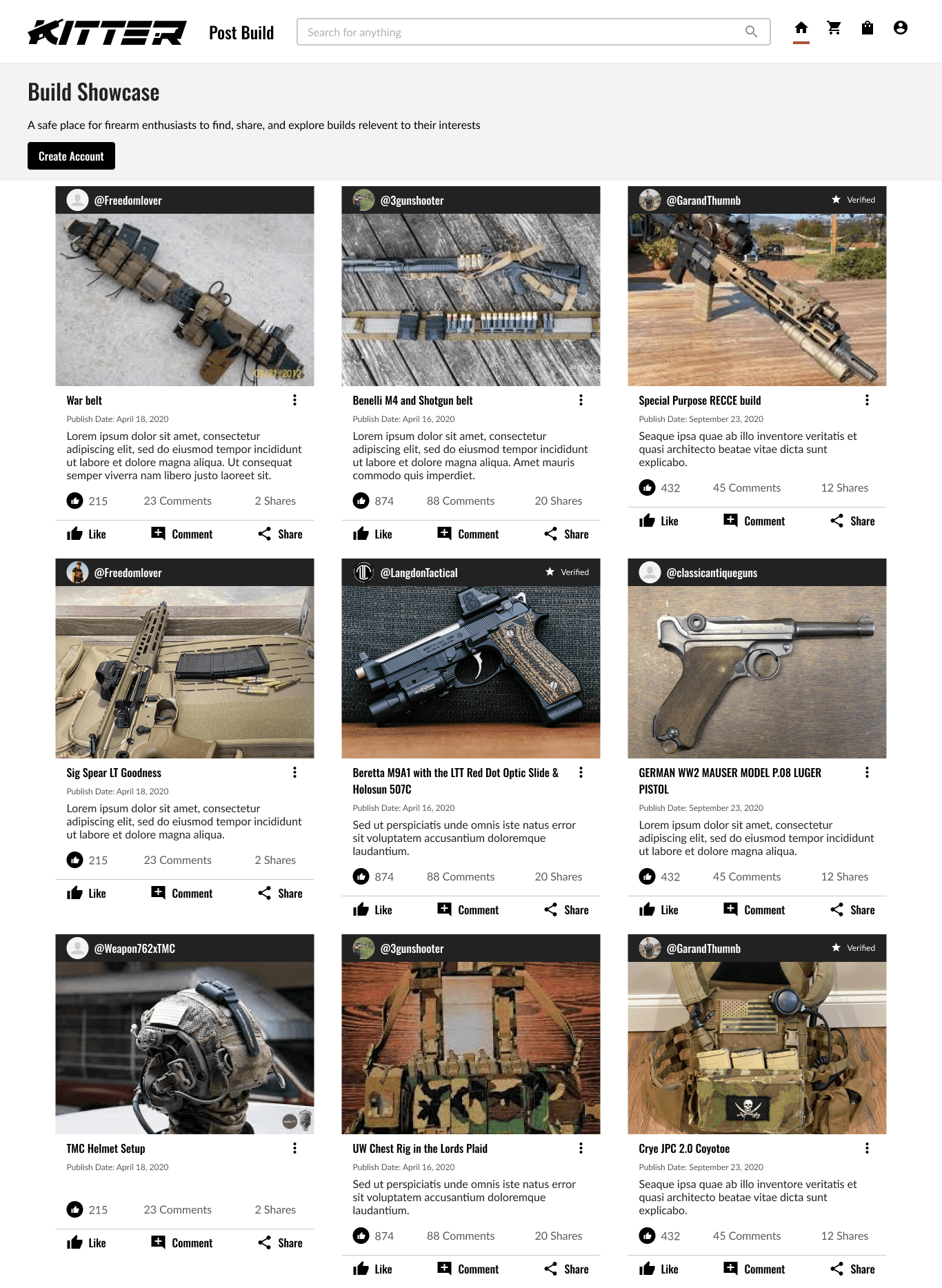
My challenge was to design a way that allowed users to stay socially engaged while easily browsing and purchasing products. Balancing the social and shopping experiences without disrupting the platform’s community feel became my main design focus throughout the project.

As the sole UI/UX Designer on this project, I had to quickly adapt to a new product, team dynamic, and development process. The startup wanted to evolve its niche social media platform by introducing an integrated eCommerce store in the near future.


My challenge was to design a way that allowed users to stay socially engaged while easily browsing and purchasing products. Balancing the social and shopping experiences without disrupting the platform’s community feel became my main design focus throughout the project.

As the sole UI/UX Designer on this project, I had to quickly adapt to a new product, team dynamic, and development process. The startup wanted to evolve its niche social media platform by introducing an integrated eCommerce store in the near future.


My challenge was to design a way that allowed users to stay socially engaged while easily browsing and purchasing products. Balancing the social and shopping experiences without disrupting the platform’s community feel became my main design focus throughout the project.

The Solution

The Solution

The Solution

I designed a unified interface that allowed users to move naturally between social interactions and product discovery without friction. The navigation, layout, and visual hierarchy were refined to make the eCommerce features feel like an organic extension of the existing platform rather than a separate experience.

I designed a unified interface that allowed users to move naturally between social interactions and product discovery without friction. The navigation, layout, and visual hierarchy were refined to make the eCommerce features feel like an organic extension of the existing platform rather than a separate experience.

04. DISCOVERY

04. DISCOVERY

Discovering the Unknown

Competitive Analysis

Competitive Analysis

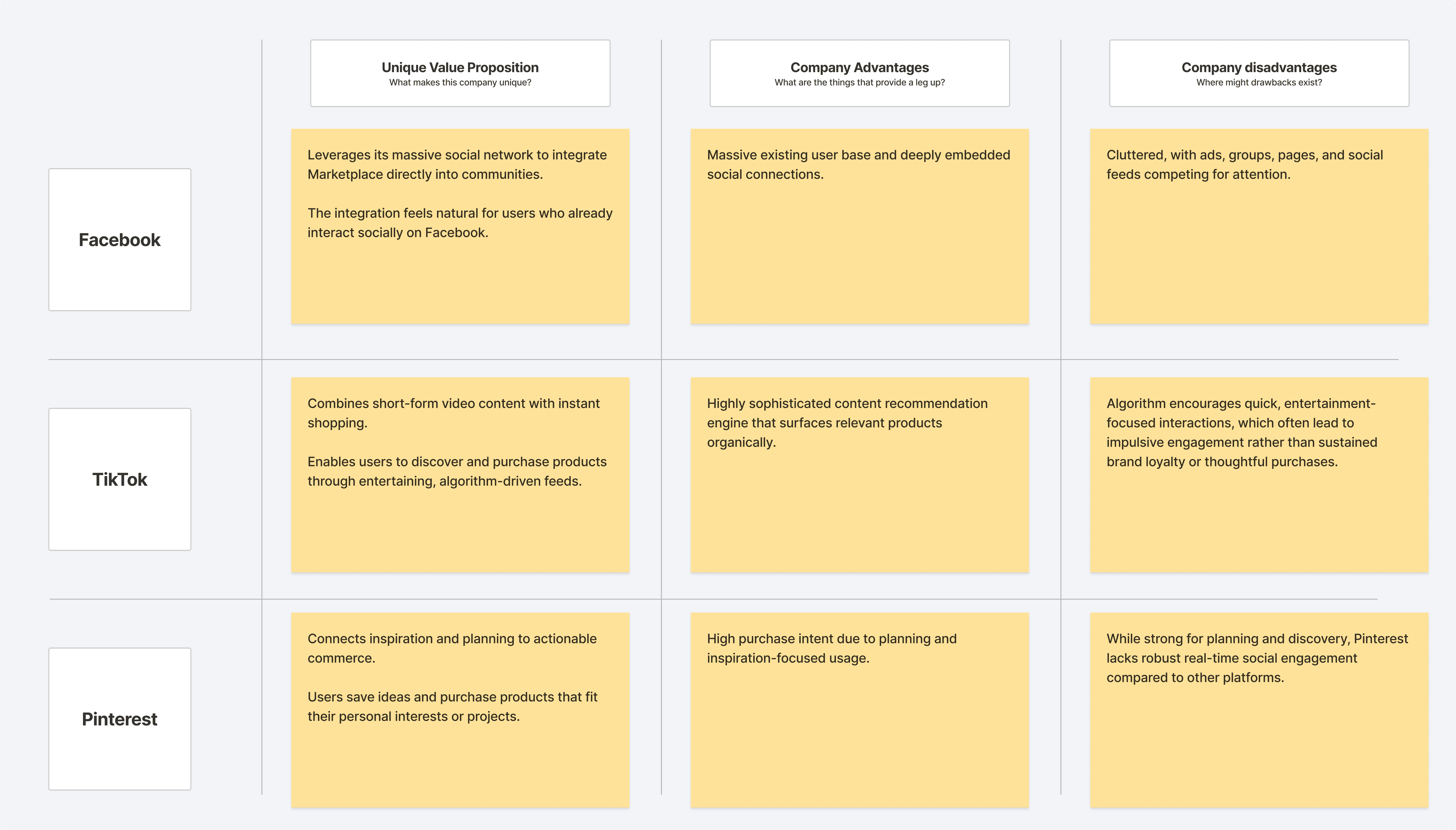
To better understand how social media platforms integrate commerce into their user experience, I conducted a competitive analysis of TikTok, Pinterest, and Facebook. These platforms were chosen for their active and fully integrated shopping ecosystems, each representing a different approach to social commerce.
To better understand how social media platforms integrate commerce into their user experience, I conducted a competitive analysis of TikTok, Pinterest, and Facebook. These platforms were chosen for their active and fully integrated shopping ecosystems, each representing a different approach to social commerce.

To better understand how social media platforms integrate commerce into their user experience, I conducted a competitive analysis of TikTok, Pinterest, and Facebook. These platforms were chosen for their active and fully integrated shopping ecosystems, each representing a different approach to social commerce.

Qualitative Research

Qualitative Research

I conducted qualitative interviews with 10 participants to uncover patterns in navigation behavior, trust perception, and checkout flow expectations. This early research focused on understanding user motivations and frustrations before any design work began. The lean sample size aligned with a startup approach—prioritizing depth of feedback and actionable insights over statistical validation.

Overwhelming Product Discovery

Overwhelming Product Discovery

Overwhelming Product Discovery

Participants frequently described existing firearm retail sites as cluttered and visually noisy. Many struggled to locate what they wanted due to dense layouts, inconsistent filtering, and competing visual elements. This revealed a need for a cleaner, more structured browsing experience that helps users focus on relevant products.

Participants frequently described existing firearm retail sites as cluttered and visually noisy. Many struggled to locate what they wanted due to dense layouts, inconsistent filtering, and competing visual elements. This revealed a need for a cleaner, more structured browsing experience that helps users focus on relevant products.

Friction in the Checkout Process

Friction in the Checkout Process

Friction in the Checkout Process

Users expressed frustration with lengthy checkout forms and redundant verification steps on competitor sites. Many felt that slow or unclear progress indicators created uncertainty about order completion. Participants emphasized the desire for a faster, more transparent checkout that minimizes unnecessary input fields and confusion.

Users expressed frustration with lengthy checkout forms and redundant verification steps on competitor sites. Many felt that slow or unclear progress indicators created uncertainty about order completion. Participants emphasized the desire for a faster, more transparent checkout that minimizes unnecessary input fields and confusion.

Lack of Trust and Transparency

Lack of Trust and Transparency

Lack of Trust and Transparency

many participants voiced concern about the credibility of online firearm retailers and the accuracy of product information. Several expressed uncertainty about which websites were legitimate, especially when prices varied between sources. This revealed a strong need for transparent communication around licensing, sourcing, and compliance

many participants voiced concern about the credibility of online firearm retailers and the accuracy of product information. Several expressed uncertainty about which websites were legitimate, especially when prices varied between sources. This revealed a strong need for transparent communication around licensing, sourcing, and compliance

Limited Social Engagement

Limited Social Engagement

Limited Social Engagement

While participants valued product reliability, they also expressed interest in engaging with like-minded enthusiasts. Most said that current firearm platforms feel transactional and impersonal, lacking opportunities to follow brands or discuss experiences. This insight supported Kitter’s goal of blending commerce with community to foster trust and ongoing engagement.

While participants valued product reliability, they also expressed interest in engaging with like-minded enthusiasts. Most said that current firearm platforms feel transactional and impersonal, lacking opportunities to follow brands or discuss experiences. This insight supported Kitter’s goal of blending commerce with community to foster trust and ongoing engagement.

User Persona

User Persona

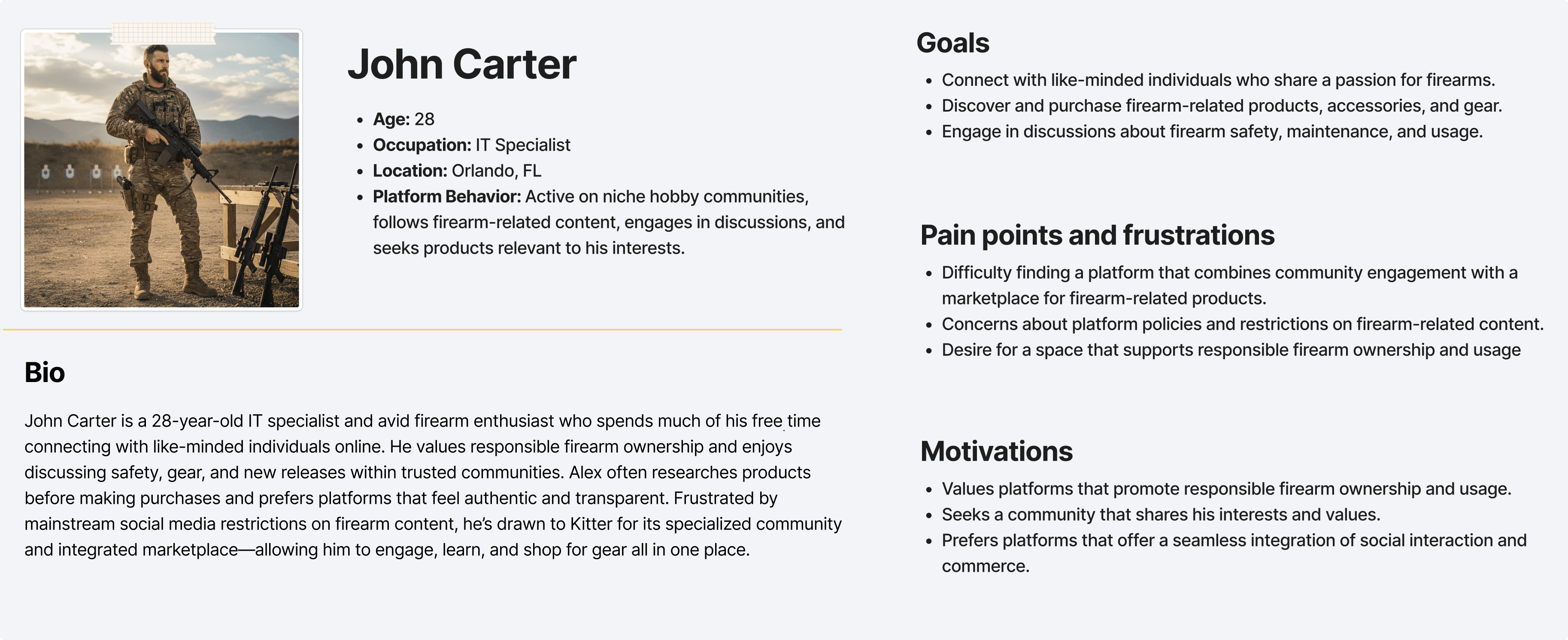
To ensure the eCommerce experience aligned with real user needs, I developed a user persona based on research insights and early community feedback. The primary persona represented a socially engaged enthusiast who values both community interaction and product discovery.

To ensure the eCommerce experience aligned with real user needs, I developed a user persona based on research insights and early community feedback. The primary persona represented a socially engaged enthusiast who values both community interaction and product discovery.

What we learned

What we learned

What we learned

I uncovered that users want a more intentional and trustworthy shopping experience within niche communities. Platforms like Facebook, TikTok, and Pinterest each excel in connecting users to products but often sacrifice clarity and trust in favor of engagement or entertainment. Interview participants reinforced these gaps—expressing frustration with cluttered layouts, unclear product information, and lengthy checkout flows. The user persona, John Carter, embodied these challenges, emphasizing the need for a platform that combines community trust with efficient, transparent shopping. These insights guided Kitter’s eCommerce design toward simplicity, credibility, and a seamless flow from discovery to purchase.

05. DEFINE & IDEATE

05. DEFINE & IDEATE

Finding the Way Forward

User Journey

User Journey

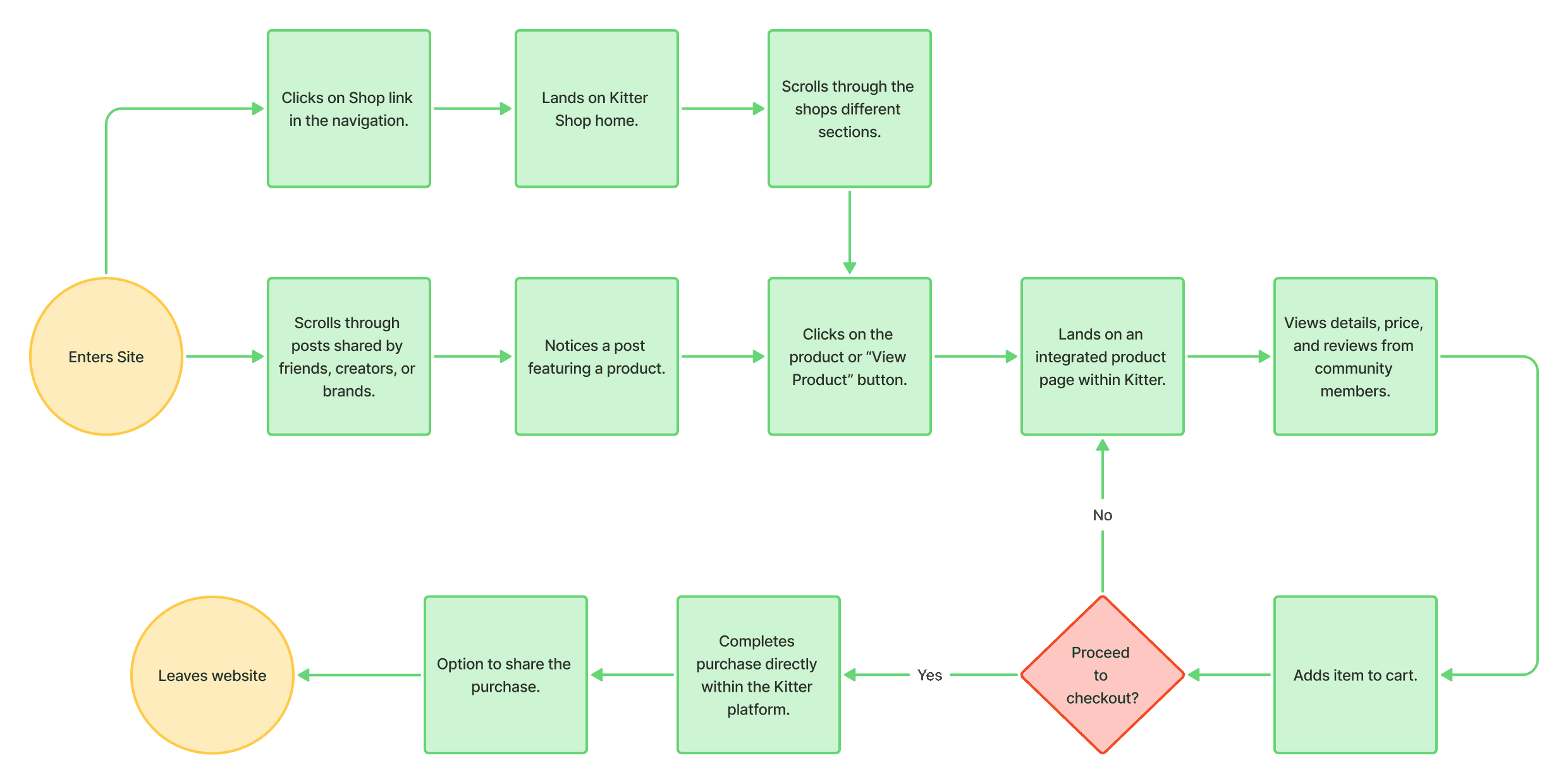
After defining user needs and key pain points, I mapped out a user journey to visualize the ideal shopping experience within Kitter. The goal was to understand how users move from discovery to purchase while maintaining clarity and trust throughout.

After defining user needs and key pain points, I mapped out a user journey to visualize the ideal shopping experience within Kitter. The goal was to understand how users move from discovery to purchase while maintaining clarity and trust throughout.

Site Map

Site Map

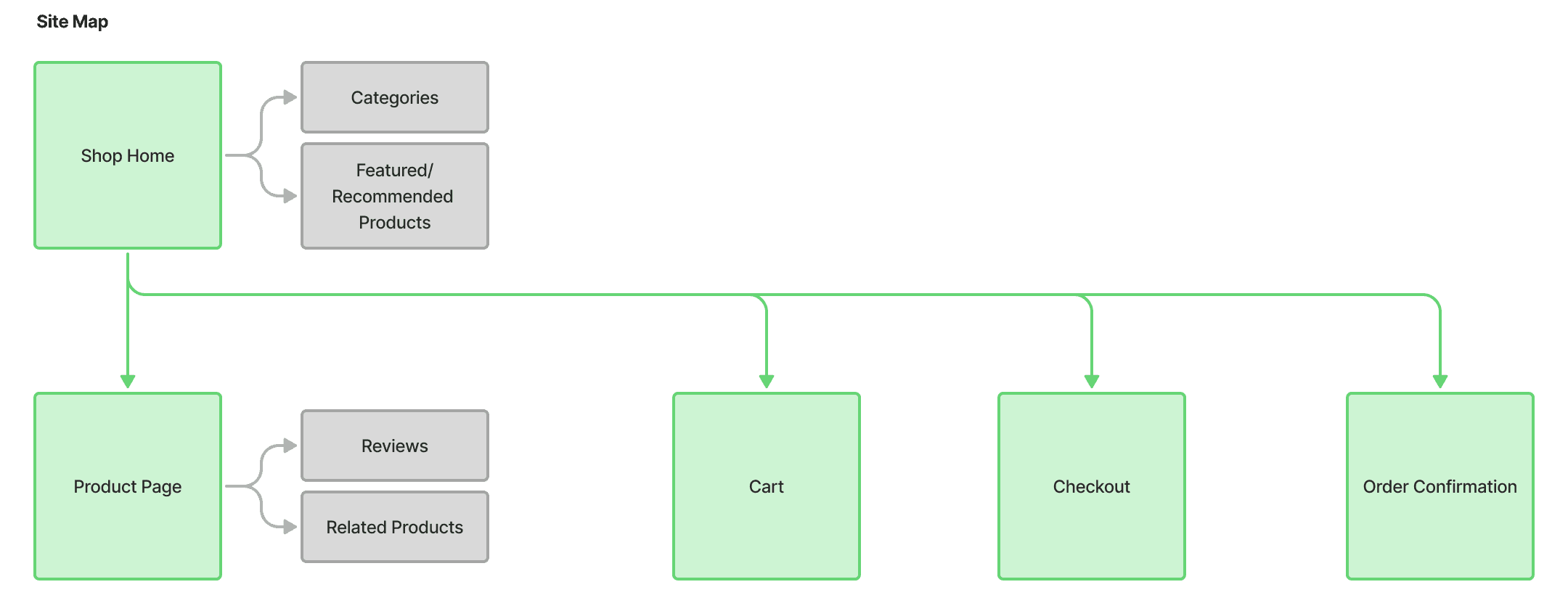
I created a site map outlining how users navigate between key pages and features. The goal was to organize content in a way that supports quick product discovery and effortless movement through the shopping process.

I created a site map outlining how users navigate between key pages and features. The goal was to organize content in a way that supports quick product discovery and effortless movement through the shopping process.

Wireframing

Wireframing

Wireframing

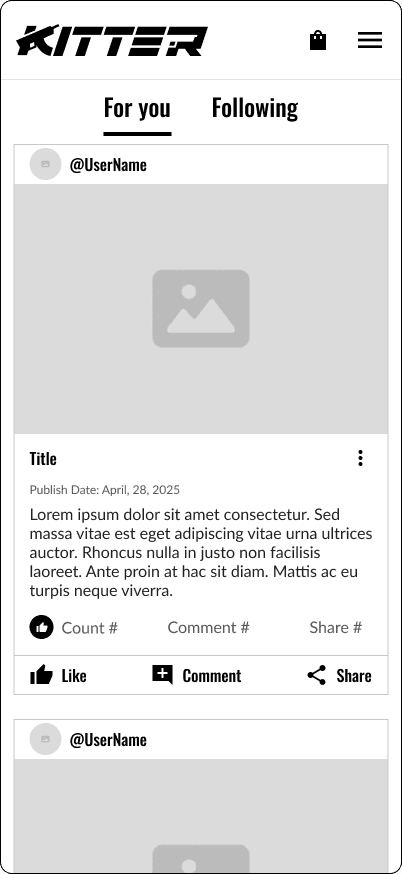
With the site structure and user journey defined, I began developing wireframes to translate research insights into tangible design solutions. The focus was on creating a clean, intuitive layout that simplified product discovery, streamlined checkout interactions, and built user trust through consistent visual hierarchy.

With the site structure and user journey defined, I began developing wireframes to translate research insights into tangible design solutions. The focus was on creating a clean, intuitive layout that simplified product discovery, streamlined checkout interactions, and built user trust through consistent visual hierarchy.

Wireframing the Vision

Building Trust Through Curation

Building Trust Through Curation

Building Trust Through Curation

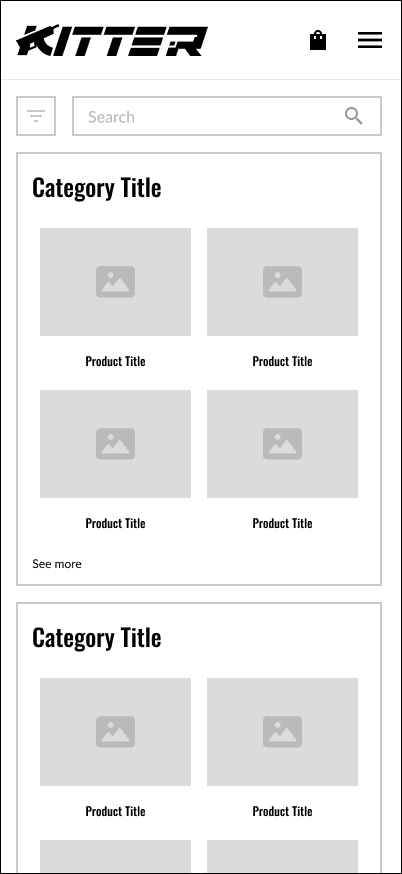
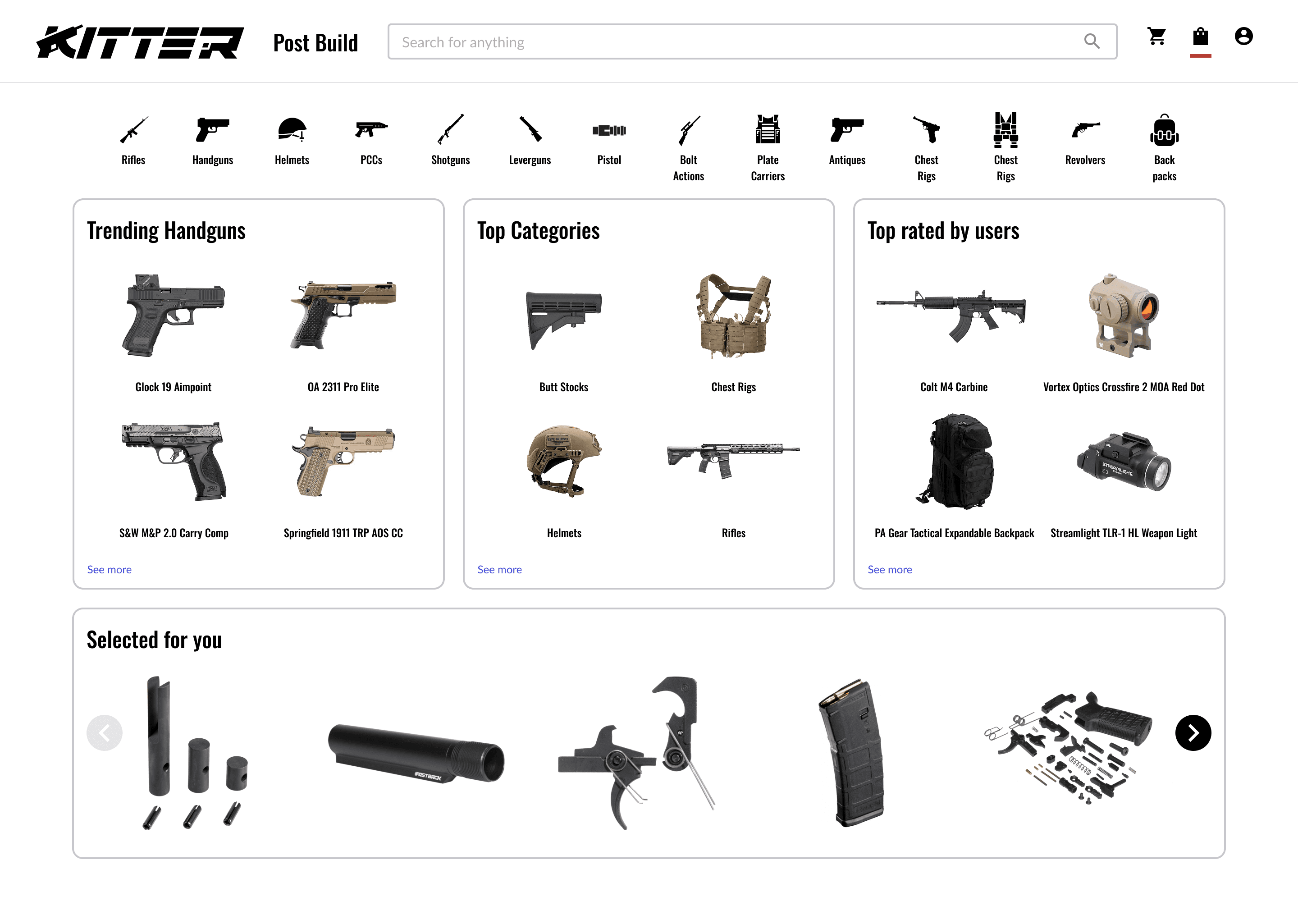
The shop page focuses on creating a balance between discovery, reliability, and social validation. By highlighting Trending Products, Trusted Sellers, and Top Rated by Users, I aimed to make shopping feel both engaging and trustworthy. Each section serves a distinct purpose—Trending Products captures community interest, Trusted Sellers showcases verified business partners, and Top Rated by Users leverages authentic feedback from the Kitter community. This structure not only supports transparency and credibility but also encourages users to explore confidently, knowing that every product and seller has earned its place through reputation and trust.

Designing for Clarity and Confidence

Designing for Clarity and Confidence

Designing for Clarity and Confidence

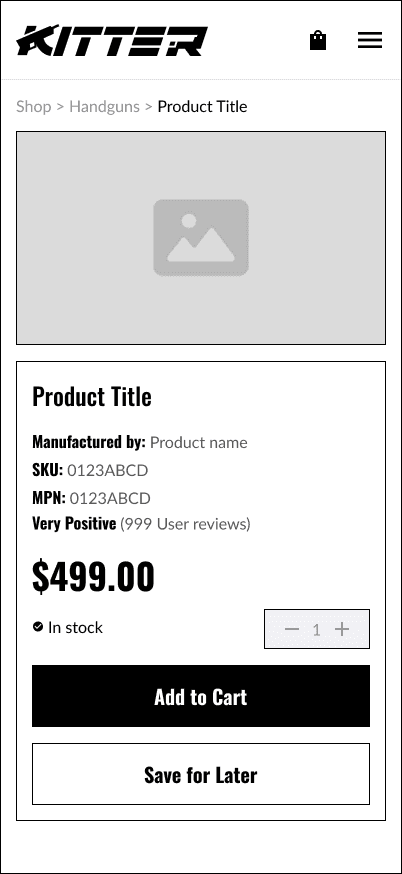
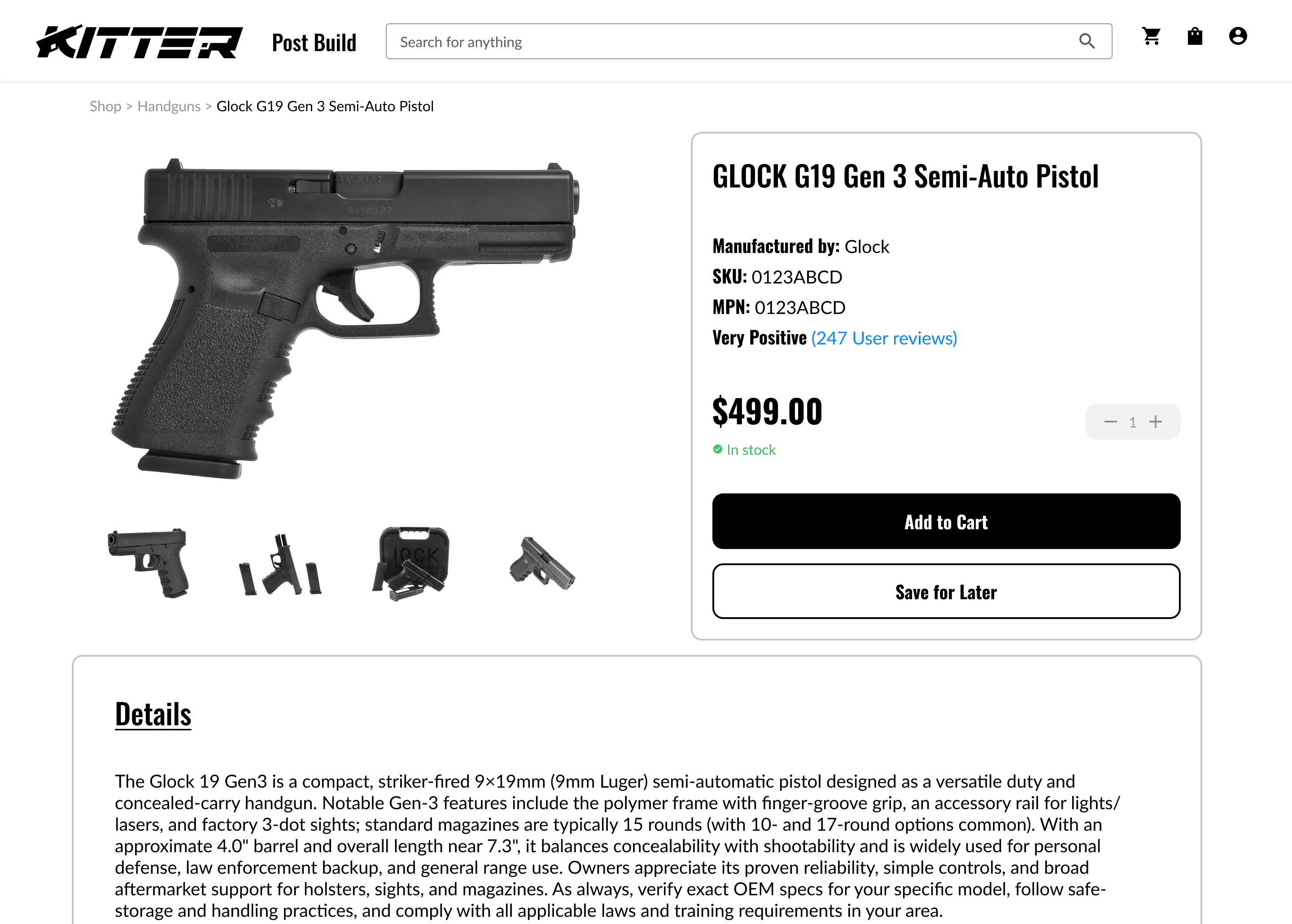
The product details page was designed to give users the information they need to make confident, informed decisions without feeling overwhelmed. This layout focuses on clear hierarchy—starting with high-impact visuals and essential specs like price, manufacturer, and stock status—followed by trust-building elements such as user reviews and detailed descriptions. Every component serves a purpose: to make the buying process transparent, simple, and reassuring. The design maintains Kitter’s visual consistency while keeping the experience responsive and intuitive across both desktop and mobile.

Simplifying the Path to Purchase

Simplifying the Path to Purchase

Simplifying the Path to Purchase

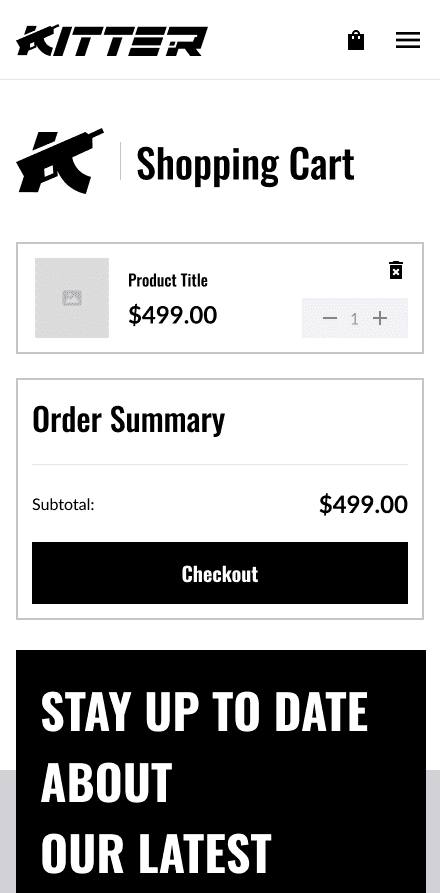
The cart page was designed to give users a clear, distraction-free view of their selected items and order details before checkout. My goal was to maintain consistency with Kitter’s clean, structured layout while ensuring that all essential information—product details, quantity, and pricing—was visible at a glance. The Order Summary panel provides a quick breakdown of subtotal, tax, shipping, and total cost, reducing uncertainty and promoting transparency. A single, prominent “Checkout” button streamlines the next step, creating a smooth transition from browsing to buying across both desktop and mobile views.

Designing a Confident Finish

Designing a Confident Finish

Designing a Confident Finish

The checkout page was designed to provide a seamless and trustworthy final step in the shopping journey. My focus was on minimizing friction and ensuring users felt secure while completing their purchase. The layout breaks the process into three simple sections—Payment Summary, Shipping Options, and Review—giving users clear visibility into each step before confirming their order. The Order Summary panel reinforces transparency with a detailed cost breakdown, while the bold “Place Order” button anchors the page and guides users to completion. Consistent across desktop and mobile, this wireframe emphasizes confidence, clarity, and ease at the most crucial conversion point.

Closing the Loop with Reassurance

Closing the Loop with Reassurance

Closing the Loop with Reassurance

The order confirmation page was designed to provide users with instant clarity and peace of mind after completing a purchase. This screen reinforces trust by summarizing key order details, including contact information, payment method, and delivery address, along with a confirmation message and unique order number. A clear success state reassures users their transaction was successful, while the “Continue Shopping” button keeps them engaged within the platform. Consistent with Kitter’s visual identity, this page delivers a confident and professional end to the shopping experience—balancing reassurance with an invitation to keep exploring.

06. UX DESIGN

06. UX DESIGN

UX Strategy

70% Boring

70% Boring

70% Boring

The foundation of Kitter’s eCommerce design was intentionally “boring.” I leaned into proven UX patterns that users already understand—like familiar product grids, intuitive navigation, and predictable checkout flows inspired by major platforms such as Amazon.

This approach reflects Jakob’s Law, which reminds us that users prefer systems that behave like the ones they already know. By embracing convention, I ensured users could shop without friction, focusing their attention on products rather than on learning a new interface.

The foundation of Kitter’s eCommerce design was intentionally “boring.” I leaned into proven UX patterns that users already understand—like familiar product grids, intuitive navigation, and predictable checkout flows inspired by major platforms such as Amazon.

This approach reflects Jakob’s Law, which reminds us that users prefer systems that behave like the ones they already know. By embracing convention, I ensured users could shop without friction, focusing their attention on products rather than on learning a new interface.

The foundation of Kitter’s eCommerce design was intentionally “boring.” I leaned into proven UX patterns that users already understand—like familiar product grids, intuitive navigation, and predictable checkout flows inspired by major platforms such as Amazon.

This approach reflects Jakob’s Law, which reminds us that users prefer systems that behave like the ones they already know. By embracing convention, I ensured users could shop without friction, focusing their attention on products rather than on learning a new interface.

30% Magic

30% Magic

30% Magic

Once the fundamentals were solid, I layered in the “magic”—the small, thoughtful details that make Kitter feel distinct.

From the strong, modern typography to the precise iconography and a balanced color palette that bridges both the social and eCommerce sides of the platform, each visual decision added personality without sacrificing clarity.


Once the fundamentals were solid, I layered in the “magic”—the small, thoughtful details that make Kitter feel distinct.

From the strong, modern typography to the precise iconography and a balanced color palette that bridges both the social and eCommerce sides of the platform, each visual decision added personality without sacrificing clarity.


Once the fundamentals were solid, I layered in the “magic”—the small, thoughtful details that make Kitter feel distinct.

From the strong, modern typography to the precise iconography and a balanced color palette that bridges both the social and eCommerce sides of the platform, each visual decision added personality without sacrificing clarity.


The Power of Boring

I anchored my UX strategy in Jakob’s Law, which states that users spend most of their time on other websites so they expect ours to work the same way.


Drawing inspiration from Amazon, the world’s most familiar eCommerce experience, I designed Kitter’s shop to feel instantly intuitive, requiring little to no learning curve. This approach not only reduces onboarding time but also streamlines future development by reusing established interaction patterns users already understand.

I anchored my UX strategy in Jakob’s Law, which states that users spend most of their time on other websites so they expect ours to work the same way.


Drawing inspiration from Amazon, the world’s most familiar eCommerce experience, I designed Kitter’s shop to feel instantly intuitive, requiring little to no learning curve. This approach not only reduces onboarding time but also streamlines future development by reusing established interaction patterns users already understand.

I anchored my UX strategy in Jakob’s Law, which states that users spend most of their time on other websites so they expect ours to work the same way.


Drawing inspiration from Amazon, the world’s most familiar eCommerce experience, I designed Kitter’s shop to feel instantly intuitive, requiring little to no learning curve. This approach not only reduces onboarding time but also streamlines future development by reusing established interaction patterns users already understand.

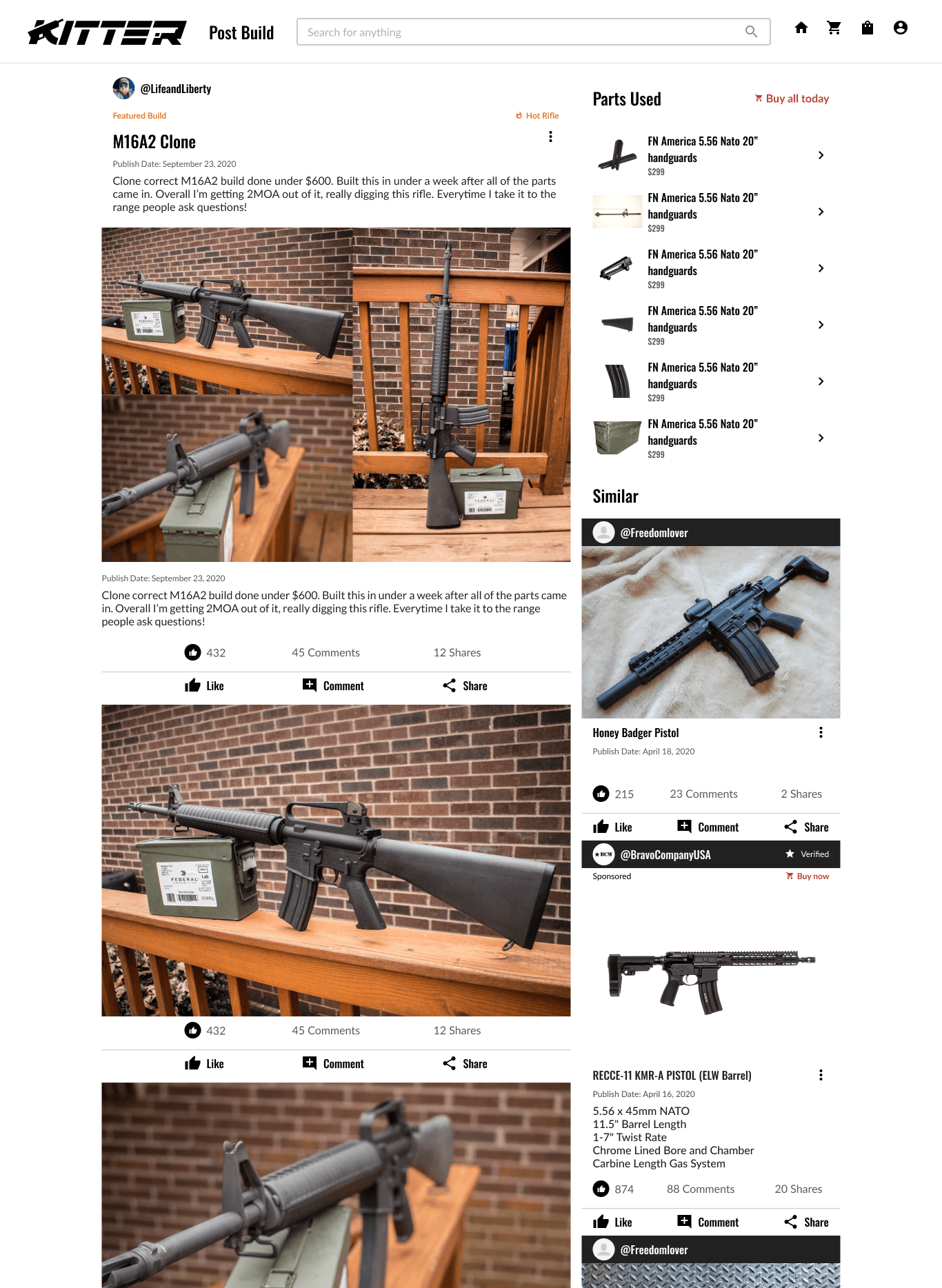
The UX Model (Amazon)

The Design

Typography

Oswald

ABCDEFGHIJKLMNOPQRSTUVWXYZ

abcdefghijklmnopqrstuvwxyz

0123456789!@#$%^&*()

Aa

Regular

Font Weight 400

Aa

Medium

Font Weight 500

Aa

Semibold

Font Weight 600

Aa

Bold

Font Weight 700

Font: Oswald serves as Kitter’s heading typeface, chosen for its bold and condensed letterforms that convey strength and precision. Its clean, modern structure gives the interface a confident personality while ensuring legibility at various scales.

Typography

Lato

ABCDEFGHIJKLMNOPQRSTUVWXYZ

abcdefghijklmnopqrstuvwxyz

0123456789!@#$%^&*()

Aa

Regular

Font Weight 400

Aa

Medium

Font Weight 500

Aa

Semibold

Font Weight 600

Aa

Bold

Font Weight 700

Font: Lato complements Oswald by bringing warmth and balance to the overall design. Its open curves and even spacing make longer text easy to read, supporting usability across both web and mobile.

Iconography

Material

Symbols

Sharp

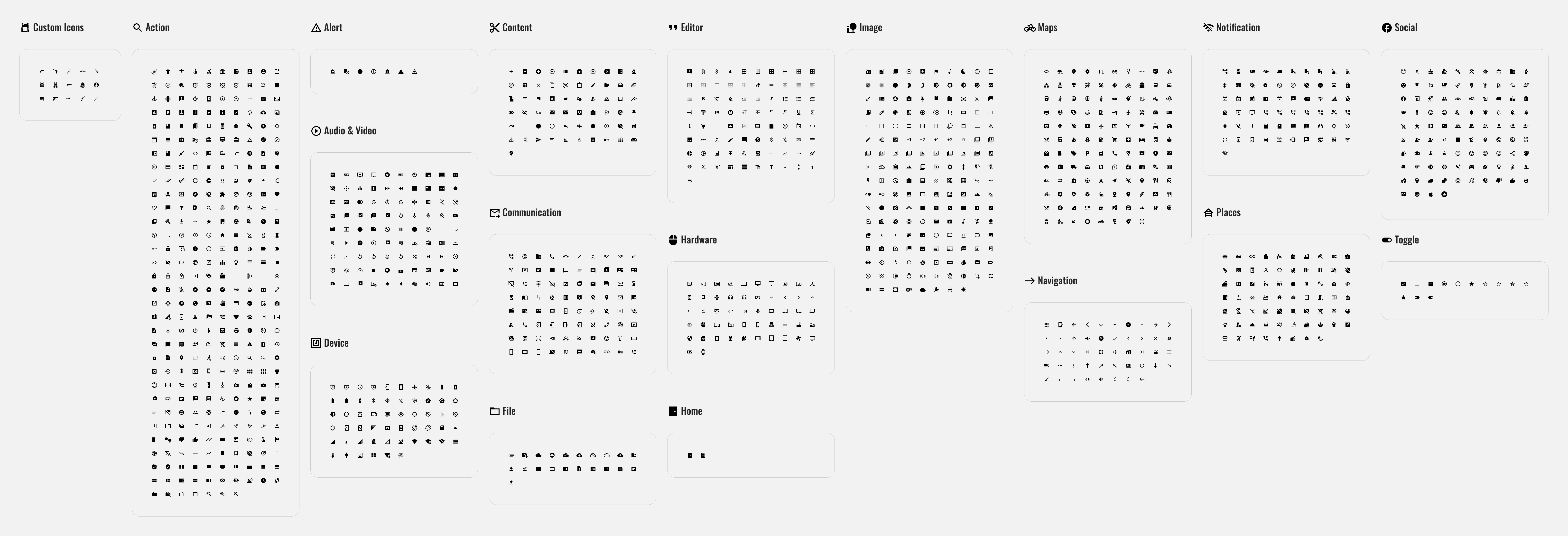
Icons: I used a mix of Material Symbols and custom icons designed to match their clean, geometric style. This combination kept the interface consistent, scalable, and aligned with Kitter’s unique visual identity.
Colors

Gray 1

#222222

Pure Black

#000000

Gray 2

#585858

Pure White

#FFFFFF

Gray 3

#999999

Off-White

#F3F3F3

Gray 4

#C8C8C8

Gray 5

#E4E4E4

Colors: We used Kitter’s neutral color palette, built around a range of grays for balance and clarity. The minimal tones maintain contrast and consistency while letting product imagery stand out.

The Magic 30%

Once the foundation was set, the remaining 30% was where the magic happened. This stage focused on refining the visual details that brought Kitter’s personality to life

Once the foundation was set, the remaining 30% was where the magic happened. This stage focused on refining the visual details that brought Kitter’s personality to life

Once the foundation was set, the remaining 30% was where the magic happened. This stage focused on refining the visual details that brought Kitter’s personality to life

07. USABILITY TESTING

07. USABILITY TESTING

What Happened When Users Tested It

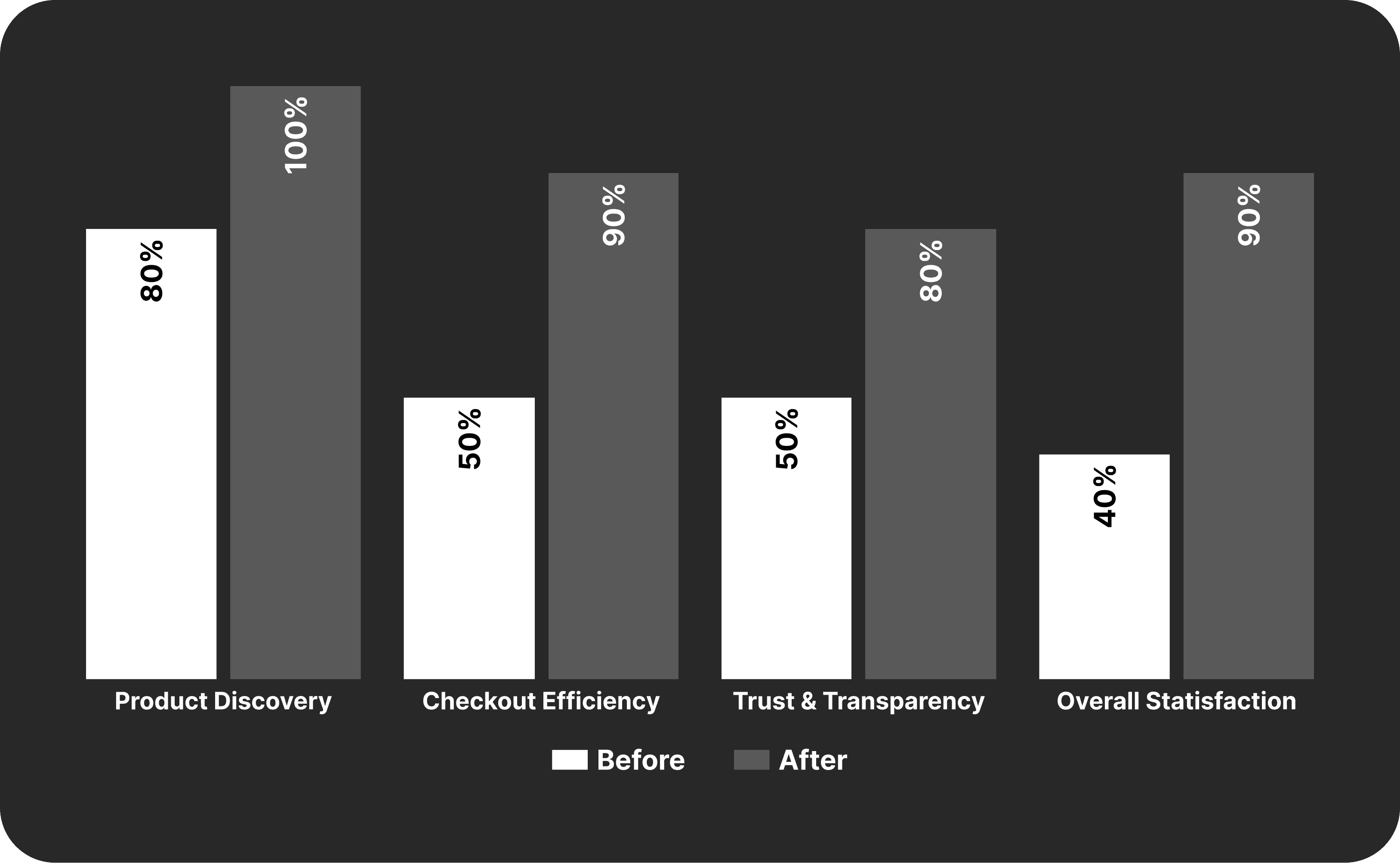
User testing showed measurable improvements in clarity, trust, and checkout efficiency, validating the design direction.

Streamlined Product Discovery

Streamlined Product Discovery

After refining the prototype, users navigated the product catalog with ease—100% of participants successfully located specific items without guidance. Clear categorization and simplified filters reduced visual clutter and eliminated the sense of overwhelm reported during discovery.

After refining the prototype, users navigated the product catalog with ease—100% of participants successfully located specific items without guidance. Clear categorization and simplified filters reduced visual clutter and eliminated the sense of overwhelm reported during discovery.

Faster, More Intuitive Checkout

Faster, More Intuitive Checkout

Faster, More Intuitive Checkout

Participants described the checkout process as “quick” and “frictionless.” Condensed form fields and clear progress indicators helped users complete purchases confidently and without hesitation.

Participants described the checkout process as “quick” and “frictionless.” Condensed form fields and clear progress indicators helped users complete purchases confidently and without hesitation.

Increased Trust and Transparency

Increased Trust and Transparency

Displaying verified distributor details, clear return policies, and licensing information on product pages significantly improved user confidence. Participants described the interface as more “legitimate” and “secure,” reinforcing Kitter’s credibility as a licensed distributor.

Displaying verified distributor details, clear return policies, and licensing information on product pages significantly improved user confidence. Participants described the interface as more “legitimate” and “secure,” reinforcing Kitter’s credibility as a licensed distributor.

Higher Overall Satisfaction

Higher Overall Satisfaction

Higher Overall Satisfaction

By combining cleaner visuals, faster checkout, and transparent product information, participants described the experience as “professional” and “reliable.” The prototype successfully balanced eCommerce efficiency with the assurance users expect from a licensed firearms distributor.

By combining cleaner visuals, faster checkout, and transparent product information, participants described the experience as “professional” and “reliable.” The prototype successfully balanced eCommerce efficiency with the assurance users expect from a licensed firearms distributor.

08. RESULTS & IMPACT

08. RESULTS & IMPACT

Where Research Met Results

User testing showed measurable improvements in clarity, trust, and checkout efficiency, validating the design direction.

Qualitative Insights

Qualitative Insights

Testing with ten participants revealed strong improvements in clarity, trust, and overall user flow. Most users described the experience as clean, intuitive, and easy to navigate, with 90% completing checkout in under one minute. Participants said the interface felt “organized” and “reliable,” noting that clear hierarchy and consistent visuals made browsing and purchasing more straightforward.

Testing with ten participants revealed strong improvements in clarity, trust, and overall user flow. Most users described the experience as clean, intuitive, and easy to navigate, with 90% completing checkout in under one minute. Participants said the interface felt “organized” and “reliable,” noting that clear hierarchy and consistent visuals made browsing and purchasing more straightforward.

Design Impact

Design Impact

Design Impact

The results confirmed that user-centered design choices effectively enhanced clarity, confidence, and task flow. Streamlined page structure and transparent product information helped reduce hesitation and decision fatigue. Consistent visual organization and simplified interactions created a smoother shopping experience that felt cohesive and trustworthy from start to finish.
The results confirmed that user-centered design choices effectively enhanced clarity, confidence, and task flow. Streamlined page structure and transparent product information helped reduce hesitation and decision fatigue. Consistent visual organization and simplified interactions created a smoother shopping experience that felt cohesive and trustworthy from start to finish.

09. CLOSING

09. CLOSING

Journey Ends

Journey Ends

Journey Ends

This project marked a defining chapter in my journey as a designer. As the sole UI/UX Designer on Kitter’s eCommerce expansion, I learned how to balance usability, brand identity, and trust while designing for both users and business goals. Although this concept isn’t being implemented immediately, the designs and documentation lay the groundwork for future development when the company is ready to expand its platform. Beyond the deliverables, this project reinforced that great design isn’t just about how something looks, but how effortlessly it works for the people who use it.

Winning Moments


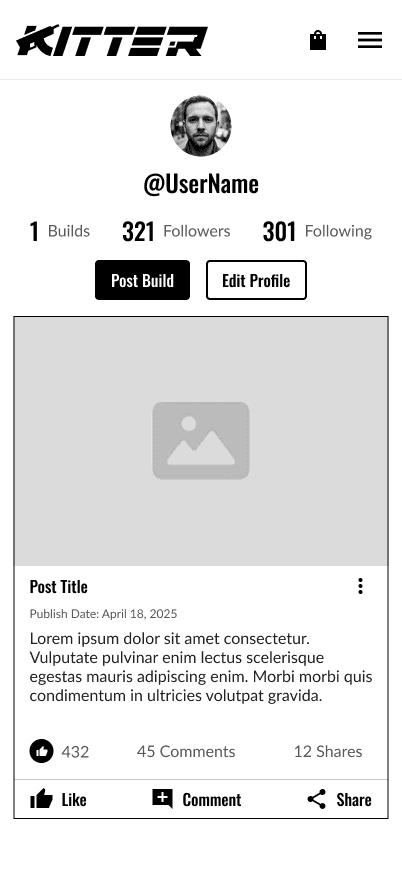
  • Integration: Successfully merging two distinct experiences—social engagement and eCommerce into a single, cohesive flow was a major milestone.


  • Familiarity: Anchoring the UX strategy in Jakob’s Law and the “power of boring” ensured that users instantly understood how to navigate the shop. By modeling the experience after familiar eCommerce patterns like Amazon’s, you reduced the learning curve, improved usability, and created an intuitive journey that balanced familiarity with brand personality.


  • Designing Solo, Delivering Big: I led the entire design process from research and wireframing to final high-fidelity mockups. Balancing stakeholder feedback, brand guidelines, and usability principles under tight timelines showcased my ability to think strategically, adapt quickly, and deliver results independently.

Winning Moments


  • Integration: Successfully merging two distinct experiences—social engagement and eCommerce into a single, cohesive flow was a major milestone.


  • Familiarity: Anchoring the UX strategy in Jakob’s Law and the “power of boring” ensured that users instantly understood how to navigate the shop. By modeling the experience after familiar eCommerce patterns like Amazon’s, you reduced the learning curve, improved usability, and created an intuitive journey that balanced familiarity with brand personality.


  • Designing Solo, Delivering Big: I led the entire design process from research and wireframing to final high-fidelity mockups. Balancing stakeholder feedback, brand guidelines, and usability principles under tight timelines showcased my ability to think strategically, adapt quickly, and deliver results independently.

Winning Moments


  • Integration: Successfully merging two distinct experiences—social engagement and eCommerce into a single, cohesive flow was a major milestone.


  • Familiarity: Anchoring the UX strategy in Jakob’s Law and the “power of boring” ensured that users instantly understood how to navigate the shop. By modeling the experience after familiar eCommerce patterns like Amazon’s, you reduced the learning curve, improved usability, and created an intuitive journey that balanced familiarity with brand personality.


  • Designing Solo, Delivering Big: I led the entire design process from research and wireframing to final high-fidelity mockups. Balancing stakeholder feedback, brand guidelines, and usability principles under tight timelines showcased my ability to think strategically, adapt quickly, and deliver results independently.

Lessons Learned


  • Simplicity: I learned that great design isn’t about doing something new for the sake of being different—it’s about making something that works beautifully. By leaning into familiar patterns and predictable flows, I saw firsthand how clarity and consistency drive user trust far more effectively than complexity ever could.


  • Collaborating: I had to work closely with developers and stakeholders to bring ideas to life. I learned that clear communication, thorough documentation, and visual consistency are essential when bridging design and development, especially in a fast-moving startup environment.


  • Continuous Process: Even though the eCommerce feature isn’t being implemented immediately, this project taught me that design doesn’t end at the final mockup. It’s about creating a foundation for future growth—building systems that can evolve as the company and its users do.

Lessons Learned


  • Simplicity: I learned that great design isn’t about doing something new for the sake of being different—it’s about making something that works beautifully. By leaning into familiar patterns and predictable flows, I saw firsthand how clarity and consistency drive user trust far more effectively than complexity ever could.


  • Collaborating: I had to work closely with developers and stakeholders to bring ideas to life. I learned that clear communication, thorough documentation, and visual consistency are essential when bridging design and development, especially in a fast-moving startup environment.


  • Continuous Process: Even though the eCommerce feature isn’t being implemented immediately, this project taught me that design doesn’t end at the final mockup. It’s about creating a foundation for future growth—building systems that can evolve as the company and its users do.

Lessons Learned


  • Simplicity: I learned that great design isn’t about doing something new for the sake of being different—it’s about making something that works beautifully. By leaning into familiar patterns and predictable flows, I saw firsthand how clarity and consistency drive user trust far more effectively than complexity ever could.


  • Collaborating: I had to work closely with developers and stakeholders to bring ideas to life. I learned that clear communication, thorough documentation, and visual consistency are essential when bridging design and development, especially in a fast-moving startup environment.


  • Continuous Process: Even though the eCommerce feature isn’t being implemented immediately, this project taught me that design doesn’t end at the final mockup. It’s about creating a foundation for future growth—building systems that can evolve as the company and its users do.

Up Next

Lets Connect!

2025 All rights reserved